
There is a new Chat client on the block! Its called Instant Bird. It is based on Mozilla and Pidgin. I gave it a try and so, far its pretty basic, and can not I believe compete with Pidgin or Kopete on Linux.
But on the upside, it seems to have the same theme and exstenion manager as Firefox does. I mean there interfaces look exactly the same. What could this mean? Well maybe that this will be super easy to theme and extend with extensions. And anyone who has read my blog for a while knows that I hate how you can't easily theme Pidgin...
ANywho if you want to check this out its here.
Showing posts with label chat. Show all posts
Showing posts with label chat. Show all posts
Sunday, February 10, 2008
Instand Bird Chat


Friday, September 28, 2007
My awn Ideas
A while ago I posted about the awn meebo applet. Which uses the iphone version of meebo to make a nifty applet for awn. Although it looked nice and function well its user interface which meebo created wasn't all that great.... don't get me wrong, it looked great. But chats woudl stay at the top of the list long after you stopped talking to someone, and lots of little things got to annoying me, along with no sound or notifications.
So I went looking into some other iphone chatting websites that coudl be used in pace of meebo:
The first one I found and tried was http://flick.im/ which also like meebo has its own iphone version. But I thought it was crap, looked not so good and wasn't please with it overall.
(By the way I dove into the meebo applets code and changed the website to that flick one, to actually use it inside the applet on awn, I don't dive into code that often......)
Anywho the next one I found was here, http://www.publictivity.com/iphonechat/
This one said you need to download it and install it into your iphone.....not a web adress i coudl easily just enter into the meebo applets code to try out... But this one had a nice online version I coudl try, and In it I saw a web address and tried plugin this into the meebo applet and weee it worked.....
But unfortunately, who ever wrote this only limits you to 10 minute sessions....and since we want to use it on the desktop that sucks. Overall though I very much was pleased with it functionality, but noticed when loaded into the meebo applet there were some things a little off which I believe coudl be fixed by changing the window size of the applet to the correct size, and some other code stuff I could know. But unfortunately the 10 minute sessions make this one crap too.
So the last one I found was this one: http://blog.twenty08.com/mobilechat/
This one seems to look nice and I would love to try it out, but they have no web client which I could point the meebo applet to. You have to download it and install it into your iphone. But the application is open source....could it be possible to get iit into awn?
Have any ideas please share.
Sunday, September 16, 2007
Meebo on the Dock
So I have loved using meebo as my chat client, and always wanted a way to have it brought back to the desktop. Then meebo created there Iphone optimized version which I thought could fit perfectly with with one of awns applets. So it seemed easy enough, just needed to get a web page to open up in a snazzy box off the dock....unfortunately I have no programing abilities.
So I made a post in the Awn forums and many people contributed and explained how it could be done, but I didn't have the time to do it. Anywho the amazing ryancr made this idea come to life!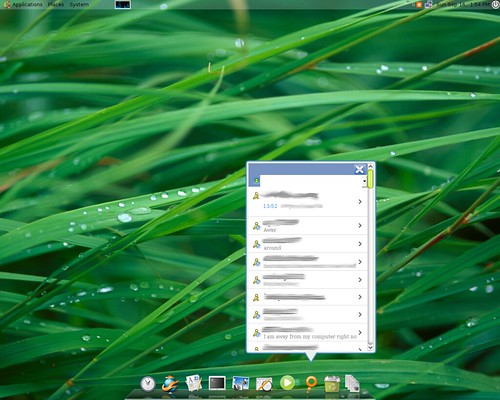
And here is another but zoomed in shot: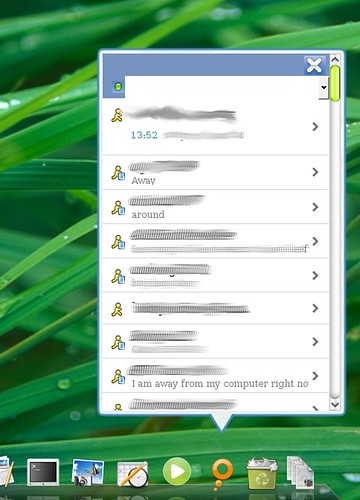
Ok so now for installation of the applet, it isn't that hard but I made some dumb mistakes cause I cant follow simple written directions.
Firstly the original post for this meebo applet is here. There is a post in there with directions and a link to download it. I will give my own directions to set it up below which may have a little clarification for some newer users.
First download it from here. Download that and extract it to /.config/awn/applets/
Next open up a terminal and type:
sudo gedit /etc/ld.so.conf
Then at the end of that file add this line:
/usr/lib/firefox
Then save and close it. Next in terminal run:
sudo ldconfig
Once you have done all that you can add the meebo mobile applet to your dock and start chatting away.
I may be wrong but to use meebo mobile you will need to have a meebo account...
Monday, July 23, 2007
Did You know? AIM for linux....
 Did you know That AIM has had a version for Linux users? When most people switch from Windows to linux they have to stop using AIM and switch to some thing like Pidgin, or Kopete. Well I got some interesting new for all you windows converts, AIM does create a version for Linux users....do I dare say anymore?
Well now lets just say the Linux version of AIM that AIM has created seems to be dead, or forgotten. I hate to disappoint you but that first picture in this blog post is AIM 6.1 and for windows...and I hate to say it but the Linux version of AIM does not seem to be on par with the windows version at all. If you read my blog you know I love the new glassy looks and want everything on Linux to be amazing looking. Well AIM's Linux version is anything but pretty. Actually it is just down right ugly, well it actually made me laugh... At first I thought it was some kind of joke, but no it seems legit. So now what you have been waiting for this whole post, what does it actually look like? So here it is the next few pictures are all pictures taken from AIM's linux download site here:

Ok maybe it's not that bad...or maybe it is you decide. But I still find it funny, that AIM actually does have a native Linux version. I will give it a try later in the day or week and let you all know if it performs anything like it looks.
Thursday, July 5, 2007
Update to my Pidgin Suggestion

Ok so I was pointed over to this link, from a user over at Newsvine. Any who it points me to a Pidgin theme which is pictured to the right. This is a good step forward even though it isn't brand new. People can create themes but now make these themes easier to implement for users who don't want to be browsing through there directories to make theme changes. If you make themes like this easier to implement more people will create pidgin themes, and you will see more be done with the look of pidgin with out having the developers of Pidgin have to re-design it themselves.
The Original Article I wrote on giving Pidgin a face lift is here.
Tuesday, July 3, 2007
My few complaints about Pidgin

Pidgin which was previously called gaim is one of the leading chat clients for Linux users. It runs swell and without a hitch and its even cooler when used with AWN. The only thing I wished it had was more customization. To me it seems Linux is all about customization, you can make your Linux Desktop look like anything now a days. One of my only complaints about pidgin is it looks, it looks so old. The Screen shot to the right is an example of how pidgin will usually look. The only things you can change look wise are the window boarders if you got emerald working or some of the icons. But for the most part changing the look of pidgin is extremely limited.
Now if you were to look at my desktop with everything minimized you would be like "WOW" everything looks so slick, clean, and modern. It looks especially spiffy with Compiz Fusion. So when I have friends over who have never seen Linux before and they are playing around with it they are all like going nuts with how cool it is, but then they open or un-minimize pidgin and everything comes crashing down. Pidgin compared to the rest of my desktop looks out of date and doesn't fit in well at all, with this new age in compositing. We need themes and compositing to be integrated with pidgin. Pidgin needs a major face lift!
So what can we look at for suggestions and ideas? I think the mock ups of Trillion Astra look fabulous! Trillion realized there previous version of Trillion did not fit in with the new look of Vista. So what did they do they updated there look, to fit in with the New Desktop. The new Trillion is beautiful. All us Linux users all know that Windows Vistas new spiffy look doesn't even come close to anything that Linux can accomplish with snazzy looks, but we too need to update some of our desktop applications to fit in with the new look. Now yes in this post I am ranting on pidgin's design but lets face it there are other programs that also just don't fit in with the new composite desktop, I just am picking on pidgin because its one of those most used applications and should be the first to get a face lift.
Linux is slowly starting to get the complete Face lift to fit in with the new composite Desktop, and I think the leader of this is Neil the creator of, AWN and Affinity. Neil has two great applications and his work has started to inspire others, like the creator of Closure. I think the pidgin developers should take a look at affinity, because it the most of all these composite programs just stated shows how cool looks and composite can be integrated into a desktop application. I think either a new chat client needs to be designed to fit in with the new looks of a composite desktop or the pidgin developers have to realize they need to change with the times!
Update: July 4th
After seeing my article, (I thought only a few would actually read) it got noticed on Digg and the comments left in the comments section mostly bashed at me. So I decided to write back and try and set things straight. My article makes it seems like I want a totally new new design for Pidgin....well I do kind of. I want pidgin to be theamable along with the chat boxes, like in adium and kopete. Linux to me is all about choice and almost most things on Linux are theamable so why stop with the most popular chat client? Some also took my article offensively and thought I was saying Pidgin sucked. Well Pidgin rocks, it is chat client I use most on my computer and I have no complaints about its functionality. This article was juts a way of stating my own opinion on the way it looks, and maybe if it got a way to be theamable then the developers wouldn't have to care what it looked liked, they coudl leave the default look, and everyone coudl make there own themes that we could download from gnome-look. Again sorry for those that took offense to my article, but its just my opinion relax.
Updated again here
Subscribe to:
Posts (Atom)