I have recently upgraded to hardy alpha 6 and so far am very very pleased. One thing I wanted to point out was hard comes with the latest Compiz Fusion and so far it is much stabler and smoother for me then the previous version.
I have not yet run into the black window bug with my nvidia card!!! But I must say I haven't tried to open as many windows as I could yet...actually let me to a small test right now.....
So I just opened 4 firefox windows, pidgin, one chat window and a pdf file, and awn...... and no black window bug!!! Could it be fixed? With the previuse version of compiz fusion I was runnign which came with Feisty I could not open more then 2 firefox windows at a time before gettign the black window bug, this is a significant performance upgrade. It probably has more to do with the latest compiz fusion release and not Hardy, but correct me if I am wrong...
Thursday, March 13, 2008
Hardy Alpha 6 thoughts


Sunday, March 9, 2008
New Compiz Fusion Animations!
OK so they are not exatly out yet, but I am told they are coming out soon. The three new animations are called, helix, blinds, and sandstorm.
There are some preview videos of them on youtube!!! So watch and enjoy:
Sandstorm:
Helix:
Blinds:
Tuesday, February 19, 2008
Touch Screen plus Compiz!
This is just a nifty video of someone using a touch screen with the 3d effects of compiz fusion or maybe older beryl:
Tuesday, December 4, 2007
Metacity now with Built in Composite!
I just read this great blog entry about how metacity is finally startign to get onto the composite bandwagon. Anywho you can download the the metacity svn and configure it for composite. So what does this mean? omposite for a lower price on cpu power. Basicly you dont need to run Compiz Fusion or xcompmgr to use awn or screenlets or any other composite needy program. While xcompmgr is also on the lite end compared to compiz fusion, I believe development has been stopped on it. So far I have tried it out and it has been pretty nice and fast, and also they seemed to have made the minimization a little more snazzier but not the maximization... anywho if you want to check it out instructions can be found on this blog post.
Saturday, November 24, 2007
Monday, November 12, 2007
Finally A Fun Desktop
If you have been reading you would know I had some java problems and also I couldn't get compiz fusion to work on gutsy. Well after a lot of help last night, I still couldn't get Compiz fusion to work, you can read what we tried here.
So after trying all that and having both those annoying problems (I really needed java to work) I had an unusual amount of free time today so I just re-installed Gutsy. And now java works, yay! Also before I tried getting Compiz Fusion to work on my own, I decided to ask for help so I didn't mess anything else up, and this help was nice and easy.
Feels good to have my 3d Desktop back
Sunday, October 7, 2007
Almost have desktop effects workign in Gutsy...
So I have been tryign to get them to work, and I have done kind of a work around, but it seems to allow me to turn on compiz fusion. But I am not getting any window boarders or animations for that matter, its like only composite is working. Heres my output while using the fusion-icon to start it:
mike@mike-desktop:~$ fusion-icon
* Detected Session: gnome
* Searching for installed applications...
Backend : ini
Integration : true
Profile : default
Adding plugin decoration (decoration)
Initializing decoration options...done
* NVIDIA on Xorg detected, exporting: __GL_YIELD=NOTHING
* Using the GTK Interface
* Starting Compiz
... executing: compiz --replace --sm-disable --ignore-desktop-hints ccp --loose-binding --indirect-rendering
compiz (core) - Error: Couldn't load plugin 'ccp'
Thursday, August 16, 2007
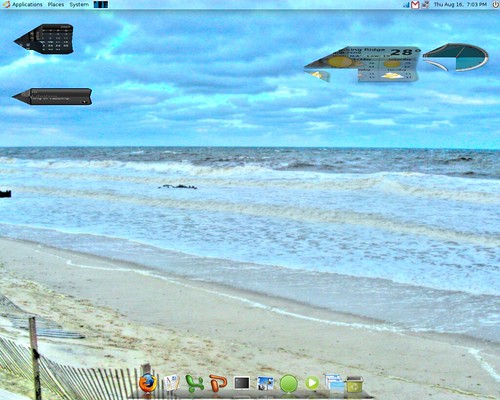
Some fun with Compiz Fusion
So while messing around in Compiz Fusion I found something that looked pretty funny/cool. To try this out you are goign to need a few things:
- Compiz Fusion
- Airplane Plugin
- Widget Plugin
- a Bunch of screenlets
This is very simple to do, make the close effect the Airplane, and then lunch a bunch of screenlets. Make sure the screenlets are set as widgets so they go to the widget layer. Now hit F-9 or what ever your key combo/mouse action is to bring up the widget layer. Now look at your widgets....how pretty....now close the widget layer and watch the fun!
If you having trouble visualizing what will happen or you do not have one of the things or any of the things to do this, well basically all the widgets fold up and fly away like a little army of planes....Ok well I found it cool!
Here are some screen shots, unfortunately my computer is too slow to allow me to record these at the same time as running Compiz so I could only try and capture some screen shots:

Tuesday, August 14, 2007
Easy install/updates for Compiz Fusion
The average Linux user, most likely does not compile Compiz Fusion from git themselves. I am sure most of you use a repo or deb, or something similar for your other distributions. Well if you like me you want the latest and greatest and repos sometimes aren't that fast for updates. Well over in the Ubuntu forums I came across an amazing little script. It will download and install the latest Compiz Fusion, and update your existing Compiz Fusion every time you run it.
Now for a super quick review of the actual script, its fairly simple to use, just download it and run it in terminal. Then you will have to answer some question here and there and it pretty much does all the hard stuff. I will say some of the questions toward the end on what it it should install I was a little confused on, but I must have picked the right answers cause Compiz Fusion is working great!
One note when installing definitely choose yes for weather or not you want to install Compiz Fusion Icon. This is very nice, and gives you an easy way to start and manage Compiz Fusion. With this installed it will allow you to start Compiz Fusion my navigating to your, Applications>System Tools>Compiz Fusion Icon. Once that is run COmpiz Fusion will start and then a Compiz Fusion Icon will appear in your notification area. Upon clickign this icon you have many useful things right at your fingertips. Such as, Compiz Settings Manager, Emerald Manager, Select Window Manager, Compiz Options (Lets you select Loose bindings and or indirect rendering), and lastly a place to select your window decorator.
Now after hearing all that you probably are like "Give me this Script!" So I will give you a link to where I found it here. Just a note before you follow those directions you may want to remove your existing compiz fusion first, thats at least what I did....Have Fun!
update:
Also the author of the script mentioned Compiz Fusion would probably work smoother/faster if you compiled it yourself this way, but I didn't really believe it when I first read it. But ever Since I tried it Compiz Fusion has been running super smooth and fast. Maybe you wouldn't notice it on a nice high end computer, But on my slow desktop I sure as hell notice a difference. So If you try this please post a comment sharing you thoughts on this...
Monday, August 13, 2007
First Compiz Fusion Release
Just a quick post here, Compiz Fusion just had the first real release! But will it have fixes for all the stability issues that users have been complaining about? I will look into this more latter, but you cna go read about the release here if you want.
Wednesday, August 8, 2007
Compiz Fusion Update
Compiz fusion recently had a poll to vote on what there new icons shoudl look like.....and thi is the winner:
I can't wait to try out this new skewer plug in, it looks like it coudl be a lot of fun. This I guess makes up for the crappy icon set chosen....
Monday, July 30, 2007
Compiz Fusion Updates
There were some Compiz Fusion updates, but nothing I found very dramatic or worth blogging about so if you want to read it you can read about them here. But at the end of that post I linked to was something super cool, which is worth writing about. To make things short and two the point, it is a paper airplane effect for the animation plugin! So here is a screenshot I took of his video they made:
Anywho it looks awesome and the plane flies around! So if you want to check out the video go here. Also information on the new animation and instructions about installing it are here.

Thursday, July 26, 2007
My Great Idea!
I really like these new Compiz Fusion effects. So I was thinking what could be better about them? While using the flip 3d plugin I noticed it even showed minimized application which is a feature I really liked....cause using a nvidia graphics card with my 64mb of video ram doesn't allow me to have lots of windows open up and showing, but i noticed I could have them minimized and still use them, I just can't use them all at once. Anyway I got a little off topic there, back to my great idea. I noticed when using flip 3d the minimized applications came up only as an icon...depicted below you see my Exaile music player is minimized so you see the Exaile icon and not the picture of what it looks like, unlike my Firefox browser in the background which is un-minimized:
Anywho what if Compiz could take a little shot of each window you opened so even if it was minimized it could pull back that shot and display it there instead of the very ugly and stretched icons?

Wednesday, July 25, 2007
New Compiz Fusion Effects
So the Compiz Fusion blog hasn't been updated in a while, but now they have and with some new effects. The first effect is a bit funky, and I probably will not use it. But I guess it would be fun to play around with. The second new effect is the one I am excited for! But I will save the best for last.
The first new effect is called, "Color Filter Plugin" yea like that sounds exciting...to bad for those color blind folks. Well actually it looks kind of cool but not very useful. Her is the description of what it does from the blog:
A new Google Summer-of-Code plugin has gone into the repositories, called ‘colorfilter’ by iXce. This allows you to change certain colors to other colors by the use of pixel shaders. You can toggle color filtering for specific windows or the entire screen. Colorfilters are loaded via special color filter files.So your like great what does any of that mean....well I will show you what it means. It means you can make your computer look like this:

Or like this:

So yea that's enough of that new plugin. To me it seems like it would be fun to play with for like 5 minutes, and then you will realize it would be a pain in the but to actually work with your computer looking like that...
system it looks So now onto the next new and even cooler plugin! Now most will think this next plugin is pretty cool but I know what a good amount of you will say, "That looks like Windows Vista, thats crap..." well let me just tell you it looks cool, and I don't give a damn what operatinglike it is from! Anywho if we got it in Linux it is more that we can shove in the face of Windows because we can use there nifty trick with a lot less computer power then they need....Ok enough wiht my ranting you want to know the next new plugin, so here we go.
The Other new plugin they mention on the Compiz Fusion blog is called, "Shift Window Switcher." So this is the description of it straight from the Compiz Fusion blog:
Onestone has release a new window swithing plugin called ‘Shift.’ This is essentially Vista-Style Flip3D switching and Mac CoverFlow Switching. There is also a reflection feature and this plugin actually does more that Flip3D and CoverFlow. You can change the angle at which Flip shows, as well as how big the windows will be and of couse, showing the text.
Now this plugin un-like the color one I mentioned first in this post could be useful. This plugin sure as hell looks cool, and seems to me liek another version of scale. I am not saying it does scale animation thingy, but it is generally the same idea, it is used to switch windows. What am I doing I almost forgot screenshot of this one!


So that is it for new plugins, in the Compiz Fusion sector. Now don't get me wrong about the color plugin who knows it may be a lot cooler then I played it up to be, I haven't tried it yet. I hate to write this on a Linux blog but I am blogging from a mac...well at least I am not blogging from vista! Anywho when I get time to get back on my favorite Ubuntu machine I will let you know how these plugins work for me.
Update:
Ok so I got back to my Ubuntu Computer, and got to try out these cool effects. I first tried the Shift window Switcher, and its really super cool. It looks very snazzy. Basically once it's up you can use your mouse wheels to scroll through the windows, and it's great! It has two modes, the flip one, which is like the vista thing and then the other mode is like mac's cover flow. I do have one suggestion for the cover flow version and that would be to see more windows on the sides of the one in the middle. But maybe you can do this and I just ned to fool with the settings.
AS for the new color plug in thing, I didn't really try it. I was a bit confused on how to get it to work...but I will do some more experimenting as the day goes on.
Sunday, July 22, 2007
Speed Improvemnt for Compiz Fusion
After my last blog post here, I was determined to get Compiz Fusion running speedy and smooth on my computer. SO I searched the Internet and came up with some fixes, and I now launch Compiz Fusion with a new command, with lots of things attached. I have no clue what they all do but they help. SO if you are having speed problems with Compiz Fusion try starting Compiz Fusion with this command:
export __GL_YIELD="NOTHING"; compiz --replace --loose-binding --indirect-rendering sleep 5; emerald --replace &
No I still do have one problem. It all runs great and smooth but for some reason my desktop is unresponsive. I can see my desktop but i cant interact with it. I con only interact with files on it if I go into the file browser. So if you have any suggestions or other Compiz Fusion speed tips share them in the comments. By the way I hear indirect rendering doesn't help with speed but I need it to some what solve the black window bug with nvidia.
Friday, July 20, 2007
Crazzyness with Compiz Fusion
So Compiz Fusion is super cool....... when it works smoothly! When I first installed Compiz Fusion before when it was still known as compcomm or actually no name at all, it worked flawlessly, and super smooth compare to when I used to run beryl. And that was saying a lot because my old nvidia video card only has like 64mb of video ram! But anywho now it seems Compiz Fusion is getting inconsistent. After some update sit runs brilliant and then sometime its just crap, eating my cpu. OK now that I have let some of my steam blow off, I know Compiz Fusion is still only alpha but I can't live without it.
Saturday, July 14, 2007
Awsome New Compiz Fusion Effect
A super cool new Compiz Fusion effect which is basically giving you super cool screen savers. I can't explain it just watch this video!!
Working on getting this working on mine at the moment, I will share my thoughts once I try it out myself, :-)
Update:
So I currently do not have this workign yet, unfortunately. The git repo I am using for Ubuntu to get Compiz Fusion has a problem with the screen Saver Plugin.....Just my luck.