The gnome main menu applet was created as another effort for people to try and use awn and get rid of all their gnome bars. Well as another stride in this direction more has been added to this applet.
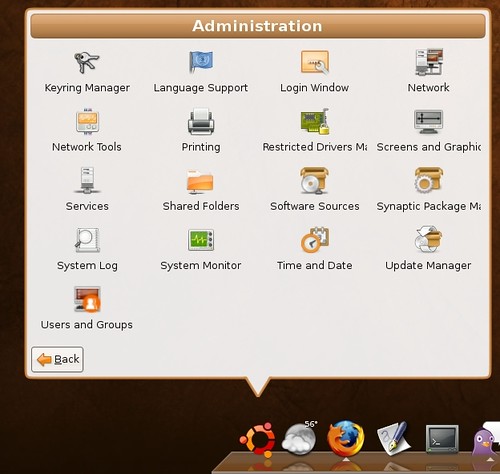
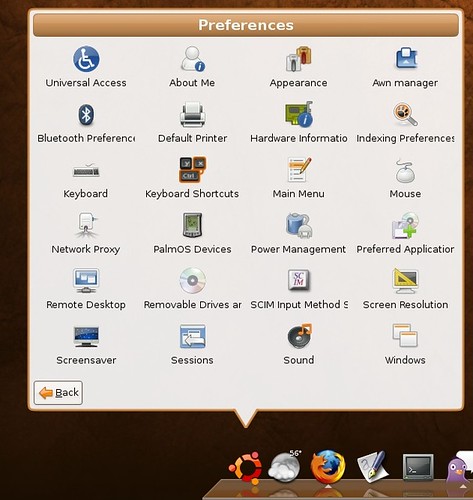
Before the applet just had the application menu, But now you can access Administration and preferences.
Here is a quick screen shot of the administration tab:
And a screen shot of the Preferences tab:
If you don't have the applet and would like it it is part of awn extras which you can be read about and find installation instructions on the new awn wiki being built. The Awn-extras page is here.
Sunday, September 30, 2007
Main Menue Applet: Preferences and Administration


Somethings broke...
Anywho I have been trying to get the desktop effects to work....its seems I just made things worse. If you look at the comments on the post about getting desktop effects to work here. Someone gave me a suggestion, and I tried it....Now my screen resolution is like 600 by something and super small, on a side not it didn't get effects to work. After switching the settings back to there original its still broken, with a super small screen resolution and in preferences I can't change it to another size cause it doesn't give me any other options....
Update 9/30/07
Ok so I just re-did my whole install since I just upgraded anyway I didn't really loose much. I am sure it was fixable just didn't have time to do all the research and bug tracking to and waiting to figure it all out. Sorry to any one who was really interested in how to fix this...
SO now its back to installing Awn....then trying to get desktop effects to work. For that I have a thread going on the Ubuntu forum and I think we may be making progress... I will let you know how it turns out.
Saturday, September 29, 2007
Ubuntu Human Theme for Awn
Now that I am using Gutsy and a Ubuntu based wallpaper background, I thought I would make a Ubuntu theme for awn and share it with all of you. Its pretty basic but fits in with the Human theme for Ubuntu very well:
So if your interested you can download it here. To use it on your awn, right click on your awn bar and open up preferences. Then navigate to themes, and click add. Then pick the ubuntu-Awn.tgz file you downloaded a minute ago and bam you now have it in your preferences. Then click the little radial dot next to my ubuntu theme, and then apply, and mayeb a refresh if it doesn't automatically show.

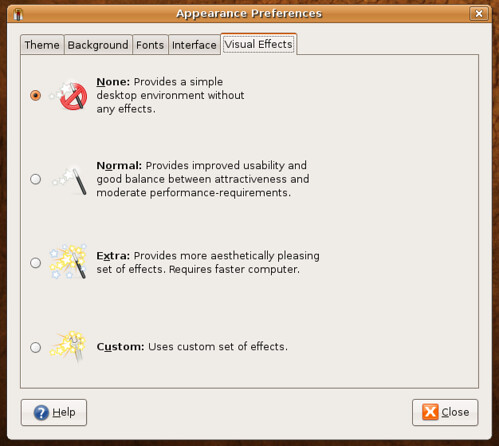
Gutsy Desktop effects Choices
Unfortunately my desktop effects still aren't working, but I installed xcompmgr to get awn to run!
But anywho I figured you would like to see what the preference dialog looks like for enabling the effects in gutsy, it seems pretty straight forward and nifty.
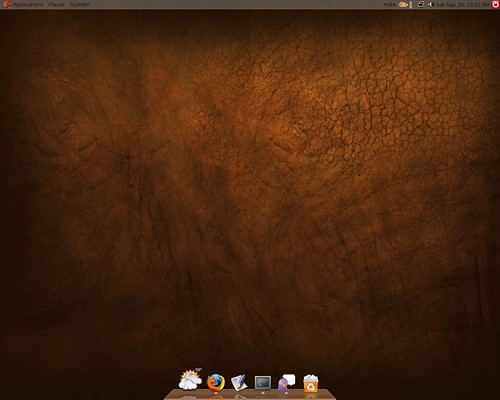
Also I personally didn't like the new Gutsy wallpaper that is on by default looks ugly and dumb I think. But it came with another cool wallpaper that I turned on instead and now my desktop is looking good:
Clean install with Gutsy....
I decided to give the Gutsy beta a try. So I downloaded it and have done a clean install on my main computer with it. I will write some post as I run into cool things or problems.
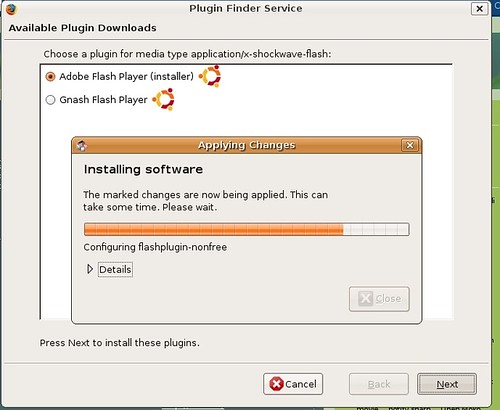
So far, its running very smooth and fast, and my favorite new thing is the ability for Firefox to detect and install plug ins such as flash. When I first tried to do this it failed though, but after an update and a restart it easily worked:
So that made gettign flash much quicker and easier. Now I am trying to turn on the desktop effects but it keeps telling me they cannot be enabled....so I will try and get those working.
At the moment I am about to get Awn set up on this install so I will write more latter.
Friday, September 28, 2007
My awn Ideas
A while ago I posted about the awn meebo applet. Which uses the iphone version of meebo to make a nifty applet for awn. Although it looked nice and function well its user interface which meebo created wasn't all that great.... don't get me wrong, it looked great. But chats woudl stay at the top of the list long after you stopped talking to someone, and lots of little things got to annoying me, along with no sound or notifications.
So I went looking into some other iphone chatting websites that coudl be used in pace of meebo:
The first one I found and tried was http://flick.im/ which also like meebo has its own iphone version. But I thought it was crap, looked not so good and wasn't please with it overall.
(By the way I dove into the meebo applets code and changed the website to that flick one, to actually use it inside the applet on awn, I don't dive into code that often......)
Anywho the next one I found was here, http://www.publictivity.com/iphonechat/
This one said you need to download it and install it into your iphone.....not a web adress i coudl easily just enter into the meebo applets code to try out... But this one had a nice online version I coudl try, and In it I saw a web address and tried plugin this into the meebo applet and weee it worked.....
But unfortunately, who ever wrote this only limits you to 10 minute sessions....and since we want to use it on the desktop that sucks. Overall though I very much was pleased with it functionality, but noticed when loaded into the meebo applet there were some things a little off which I believe coudl be fixed by changing the window size of the applet to the correct size, and some other code stuff I could know. But unfortunately the 10 minute sessions make this one crap too.
So the last one I found was this one: http://blog.twenty08.com/mobilechat/
This one seems to look nice and I would love to try it out, but they have no web client which I could point the meebo applet to. You have to download it and install it into your iphone. But the application is open source....could it be possible to get iit into awn?
Have any ideas please share.
Wednesday, September 26, 2007
Attendi the new Qunu
This is a linux blog, but I do tend to review some new websites every once in a while, and sometimes I stretch it to try and relate it to Linux. A while ago I wrote about Qunu, which is a website you can go on and find someone to chat with for help. I mentioned it was a great place to get help with Linux and it was. On a quick side note Qunu has been down for some time but there sites claims they will be up this coming Monday. So back to the site at hand Attendi:
Attendi's tag line is, "search powered by experience". Like Qunu you can register and tag your self about things you know. Then people can search and find you and get help from you. What separates Attendi from Qunu is it saves all you help session chats which then are put into there database and are searchable. I think this is a great idea, because all the chats I have had on Qunu I know could have helped others. I think this is a great idea, and if you a linux expert who i swilling to help out other please go join Attendi, it seems there linux community of helpers is very small at the moment.
The site is in beta and you need to submit your email address and wait but they took me the next day.....but I have a few invites I coudl also give out if they don't get to you.
By the way here is the link to the site:
http://www.attendi.com
Subscribe to:
Posts (Atom)